
Find us at booth #83, join us for a harbor side happy hour, or catch Gorish’s talk.

Sept, 16-18 > Learn more


Tamanna Mishra

September 12, 2026
.png)
An AI call summary can be clear, concise and completely wrong about the part of the conversation that matters.
It can turn a tentative date into a committed deadline. It can assign a buyer objection to the seller. It can record a proposed next step as an agreed action. It can compress two conflicting stakeholder opinions into one neat but false conclusion.
For sales teams, that is not a minor note-taking problem. A bad summary can contaminate CRM data, distort qualification, weaken follow-up and give managers a false picture of deal health.
The standard for an AI sales call summary should therefore be higher than, “Did it produce readable notes?” A useful summary must preserve the buyer evidence that matters, show what is still unknown and help the team take the correct action next.
That need is real. Salesforce’s 2026 State of Sales research found that the average seller spends only 40% of their time selling. But reducing administration is only half the job. Automating the wrong information simply moves bad data faster.
This guide explains what an AI call summary should include, how to evaluate its accuracy and how sales-ready platforms such as Sybill connect summaries to CRM updates, coaching, follow-up and deal execution.
An AI call summary uses speech recognition and generative AI to turn a recorded conversation into a shorter, structured account of what happened. A sales-ready summary should capture buyer needs, stakeholders, decision criteria, objections, competitors, commitments, next steps and missing information.
The best AI call summary software should also let teams customize the output by call type and sales methodology, inspect the supporting conversation, update CRM fields, generate follow-up, surface coaching opportunities and answer questions across the complete deal history.
Before buying a tool, test it on several representative calls. Measure factual accuracy, speaker attribution, critical omissions, unsupported inference, next-step accuracy, CRM usefulness and the amount of editing required.
Generative AI is very good at producing language that sounds confident. Confidence is not evidence. The NIST Generative AI Profile identifies confabulation as a core risk: a system can confidently present erroneous or false content. In a sales call summary, the error may look perfectly reasonable.
Suppose a buyer says:
“October would be ideal, but I need to check whether security and procurement can support it.”
A weak summary might report:
“The customer plans to implement in October.”
The sentence is tidy. It is also commercially dangerous. October is a preference, not a confirmed implementation date. Two approval dependencies remain unresolved.
Other summary errors are just as easy to miss:
This is why summary quality cannot be judged only by readability, brevity or speed. It must be evaluated against the source conversation and the commercial decisions the summary will influence.
An AI call summary is a generated record of the important information discussed during a recorded phone call or meeting. The system typically transcribes the conversation, identifies speakers, extracts important points and organizes them into a condensed output.
General-purpose call summaries often focus on topics discussed, decisions and action items. An AI sales call summary should go further. It should structure the conversation around the information required to understand and progress a deal.
Zoom’s AI call summary documentation describes summaries that capture discussion points, names, dates and next steps. That is useful for general calls. Sales teams also need qualification evidence, stakeholder roles, decision dynamics, objections, competitive context, deal risks and coaching information.
A transcript answers, “What was said?” A summary answers, “What mattered in this conversation?” Deal intelligence answers, “What does the available evidence mean for this opportunity?”
Strong sales software should connect all three without pretending they are interchangeable.

There is no single perfect template for every meeting. A discovery call, product demonstration, negotiation, implementation handoff and renewal conversation should not produce identical summaries.
However, most sales-ready summaries need eight evidence categories.
State why the meeting happened and what changed because of it.
“Product demo completed” is activity. “The primary evaluator will build an internal business case, but a proof of concept is on hold until budget approval” is an outcome.
Capture the problem in the buyer’s language. Separate symptoms from business impact.
If the buyer says managers lack visibility because call recordings are not analyzed, do not inflate that statement into an unverified revenue-loss claim. Record the operational problem, then flag the financial impact as missing.
The summary should support the team’s chosen methodology, whether that is MEDDPICC, BANT, SPICED, Challenger or a custom framework.
Useful fields might include metrics, economic buyer, decision criteria, decision process, pain, critical event, champion and competition. Missing fields are valuable information. “No quantified metric discussed” is more useful than a blank box or an invented estimate.
Identify who said what, who is evaluating, who controls budget and who has not yet engaged.
An enthusiastic evaluator is not automatically a champion. A senior title is not automatically the economic buyer. The summary should preserve those distinctions.
Capture objections in the buyer’s words where possible. Separate an objection that was resolved from one that was acknowledged and left open.
Risks can include price sensitivity, unclear differentiation, implementation effort, missing executive access, weak urgency or the absence of an agreed next meeting.
Record named competitors, incumbent tools, internal build options and the possibility of doing nothing. Include what the buyer values or dislikes about each alternative.
Every next step should include an owner and a date when either was agreed. The summary should distinguish among:
Those four categories should never be merged into one task list.
Use explicit evidence labels:
This simple distinction prevents an account team’s shared assumption from gradually becoming a CRM “fact.”

Consider an anonymized product-evaluation call with these facts:
Here is how three summaries might handle that call.
The sales-ready version can then expand into sections that help different users do their jobs.
This is the difference between summarizing a conversation and making it usable. The output supports the salesperson, manager, RevOps team and forecast review without pretending that the opportunity is healthier than the evidence suggests.
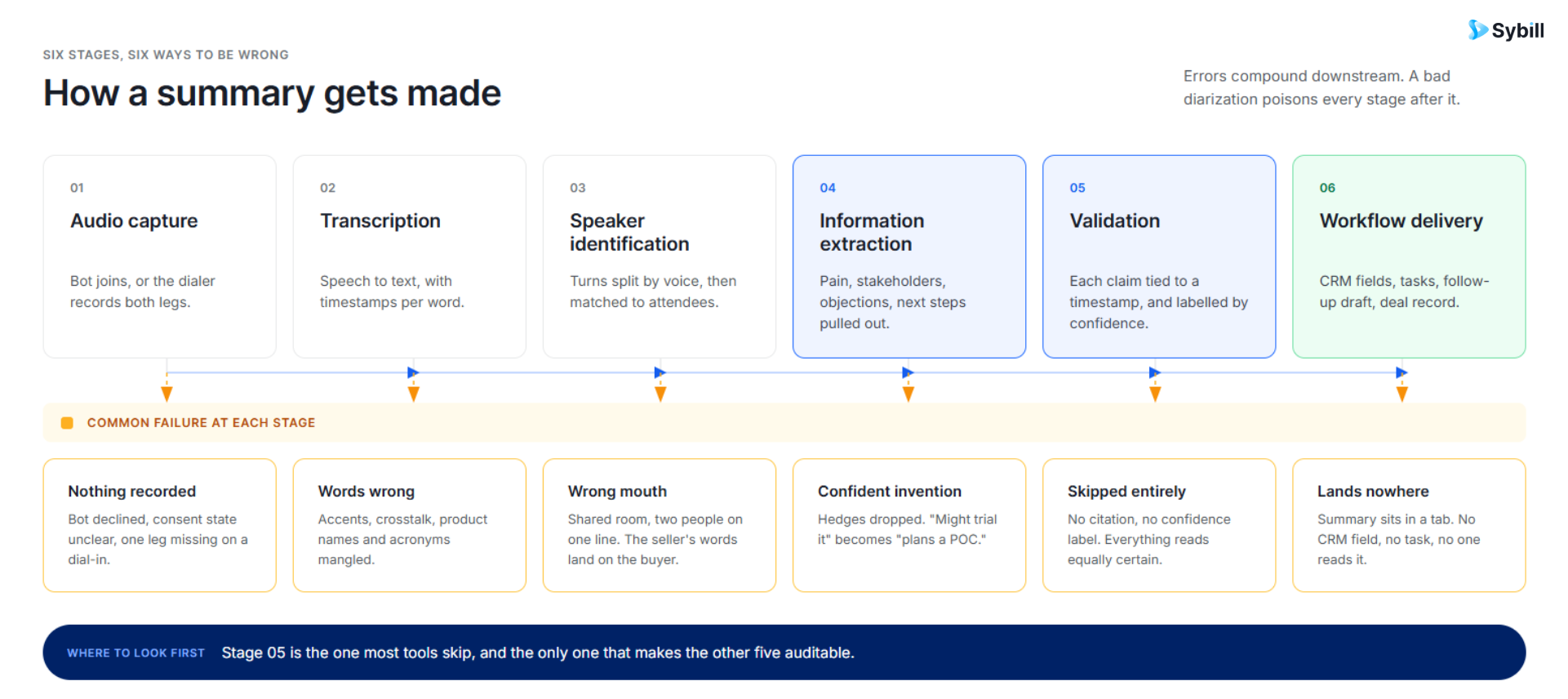
Most AI call summarizers follow a multi-stage process.
The platform records or ingests the meeting. Audio quality, speaker overlap, connection problems and microphone quality affect every later stage.
Speech recognition converts audio into text. Names, product terminology, acronyms, accents and poor audio can create transcription errors.
The system attempts to distinguish participants and assign statements correctly. An accurate sentence attributed to the wrong person can still produce a dangerous summary.
The platform identifies topics, entities, questions, objections, commitments, dates and other relevant details.
Generative AI condenses and organizes the extracted information. Custom prompts or templates may tell the system to produce MEDDPICC fields, coaching observations, next steps or another required format.
The strongest systems help users compare the generated output with the transcript, recording, timestamps or clips. Human review remains important when the summary will influence forecasting, pricing, contractual commitments or another consequential decision.
The summary is sent to the CRM, email, Slack, task system or deal workspace. This is where a summary becomes operational, but it is also where an uncorrected error can spread.
Do not evaluate tools using only a vendor’s clean demo call. Use your team’s recordings, call types, languages, sales process and CRM requirements.
Teams operating across regions should test representative recordings rather than relying on a language count. This guide to multilingual AI meeting note takers explains additional evaluation considerations.
Changing from paragraphs to bullets is cosmetic customization. Structural customization means the team can determine which evidence appears, how it is defined and when it is required.
A discovery-call summary may need pain, impact, stakeholders and qualification gaps. A demo summary may need use-case reactions, product questions, technical concerns and competitive comparisons. A negotiation summary may need concessions, approvals, legal issues and commitments.
The tool should adapt without asking every salesperson to rewrite a prompt after every call.
Ask vendors to demonstrate how a call statement becomes a CRM update. Confirm:
If HubSpot is part of the stack, inspect the complete Sybill HubSpot integration rather than evaluating the call summary in isolation.
“Ask more questions” is not useful coaching. Strong coaching identifies the relevant moment, explains why it mattered and recommends a more effective alternative.
For example:
When the buyer said the platforms looked similar, the seller responded with broad product claims. A stronger response would have tied one clear difference to the buyer’s stated RevOps constraint and supported it with customer evidence.
Managers should also be able to find patterns across calls. Sybill’s sales coaching AI supports questions about discovery, objection handling, urgency and performance over time. For a more detailed workflow, see how to coach sales representatives using call recordings.
Select five representative calls:
For each call, have a human reviewer compare the output with the recording and transcript. Score:
The winner is not necessarily the tool with the longest summary or the most features. It is the tool that produces the most reliable and usable output across your real calls with the least correction.
“For sellers there’s never enough hours in the day. Sybill’s summaries help stay on top of everything.” Kyle Eligio, Sales Development and Partnerships Manager at Bigeye, on Sybill Magic Summary.
Sybill’s own product-evaluation calls illustrate why a useful sales summary needs more than topics and action items. In an anonymized internal example, a customized Sybill Magic Summary organized one product demonstration into several connected views.
Teams operating across regions should test representative recordings rather than relying on a language count. This guide to multilingual AI meeting note takers explains additional evaluation considerations.
Changing from paragraphs to bullets is cosmetic customization. Structural customization means the team can determine which evidence appears, how it is defined and when it is required.
A discovery-call summary may need pain, impact, stakeholders and qualification gaps. A demo summary may need use-case reactions, product questions, technical concerns and competitive comparisons. A negotiation summary may need concessions, approvals, legal issues and commitments.
The tool should adapt without asking every salesperson to rewrite a prompt after every call.
Ask vendors to demonstrate how a call statement becomes a CRM update. Confirm:
If HubSpot is part of the stack, inspect the complete Sybill HubSpot integration rather than evaluating the call summary in isolation.
“Ask more questions” is not useful coaching. Strong coaching identifies the relevant moment, explains why it mattered and recommends a more effective alternative.
For example:
When the buyer said the platforms looked similar, the seller responded with broad product claims. A stronger response would have tied one clear difference to the buyer’s stated RevOps constraint and supported it with customer evidence.
Managers should also be able to find patterns across calls. Sybill’s sales coaching AI supports questions about discovery, objection handling, urgency and performance over time. For a more detailed workflow, see how to coach sales representatives using call recordings.
Select five representative calls:
For each call, have a human reviewer compare the output with the recording and transcript. Score:
The winner is not necessarily the tool with the longest summary or the most features. It is the tool that produces the most reliable and usable output across your real calls with the least correction.
“For sellers there’s never enough hours in the day. Sybill’s summaries help stay on top of everything.” Kyle Eligio, Sales Development and Partnerships Manager at Bigeye, on Sybill Magic Summary.
Sybill’s own product-evaluation calls illustrate why a useful sales summary needs more than topics and action items. In an anonymized internal example, a customized Sybill Magic Summary organized one product demonstration into several connected views.

The opening paragraph explained what happened, what the buyer would do next and what blocked progress:
The seller provided a live walkthrough and discussed differentiation, pricing and the proof-of-concept process. The primary evaluator will review the recording and pricing internally. A proof of concept remains on hold until budget approval, and no follow-up date has been agreed.
That is short enough to scan but cautious enough to trust.
The same summary populated MEDDPICC-style fields. It explicitly stated that no quantified metric or critical event had been discussed, identified the budget holder, recorded early decision criteria and distinguished an active evaluator from a proven champion.
Blank qualification fields often disappear during pipeline reviews. Explicitly recording “not discussed” keeps the gap visible.
The summary separated broader deal risks from the buyer’s stated objections.
Risks included an uncommitted timeline, weak differentiation and implementation concerns. Objections preserved the buyer’s language around price, feature similarity and seat costs.
This separation matters. A risk is the team’s assessment of what could damage the deal. An objection is something the buyer has expressed. They may overlap, but they are not the same evidence.
The customized output also evaluated seller execution:
This makes the same call useful to the account executive and the manager. The rep gets a specific next move. The manager gets a coachable moment tied to a live deal.
Jeffrey Galbraith, VP Sales at Smartcat, describes the operational effect plainly: “I no longer spend 90% of 1:1s chasing CRM updates; now I coach.”
The summary did not stop at “send follow-up.” It recommended the assets and actions most likely to improve the deal:
Sybill AI Tasks can then help move those actions from a list towards execution, including drafting follow-up, creating calendar invitations and building requested collateral for user approval.
The customized summary also included:
That depth is not necessary for every user or meeting. The point is that the structure can reflect what the team needs to inspect.
Sybill’s Magic Summary users can add, edit, hide and reorder fields, use custom AI prompts and determine which sections appear for different meeting types. A discovery call, demo and proposal call can therefore produce different evidence structures without asking the rep to rebuild the summary manually.
A static summary answers the questions its template anticipated. A queryable sales record lets someone investigate the questions that arise later.
With Ask Sybill, a sales rep or manager can ask questions across calls, emails, CRM records, calendar activity and other available deal context.
Useful questions might include:
The distinction is important:
Sybill can also surface coaching patterns across calls. A rep can ask how their objection handling has changed. A manager can ask which calls contain missed qualification or which team members need help with a particular skill.
The call summary becomes part of a searchable sales memory rather than a note that is opened once and forgotten.
The summary should be the beginning of the post-call workflow, not its final destination.
CRM Autofill can use custom prompts to populate standard and custom CRM fields based on calls and emails. Teams can configure fields for their methodology, competitors, decision criteria, next steps, risks and other information they inspect.
The purpose is not merely to maximize field completion. It is to make the CRM reflect current buyer evidence with less rep administration.
Personalized Emails can turn the conversation into a draft follow-up using the buyer’s context and the seller’s tone. The salesperson should still review commitments, dates, pricing and attachments before sending.
AI Tasks can recognize work created during the call, prioritize it and help prepare emails, meetings, information requests and collateral for approval.
Pre-meeting Briefs help the team prepare using previous interactions and deal context. Deal Workspace keeps summaries, qualification evidence, risks and next actions connected to the ongoing opportunity.
The useful workflow is:
Call → Summary → Verification → CRM → Follow-up → Tasks → Coaching → Next meeting
That is a more demanding standard than “the notes arrived quickly.” It is also where AI call summary software creates measurable operational value.
Review the output carefully when it contains:
The level of review should match the consequence of the decision. A minor typo in an internal recap is different from an incorrect close date pushed into the forecast.
Organizations should also define who can access recordings and summaries, how long data is retained, how exports and deletions work, and whether the vendor uses customer content to train models. Sybill publishes current security information in its Trust Center.
Recording and consent requirements vary by location and situation. Work with legal counsel to determine the applicable process, give participants the required notice and configure recording controls accordingly.
Conclusion: Judge the Evidence, Not the Prose
The wrong question is, “Did the AI write a good recap?”
The better questions are:
A polished paragraph may save a few minutes. A trustworthy, customizable and queryable AI call summary can improve how the entire revenue team remembers, inspects and acts on buyer conversations.
Explore Sybill Magic Summary to see how customizable summaries connect call evidence to CRM updates, coaching, follow-up and sales execution.
An AI call summary is a generated record of the important information discussed during a recorded phone call or meeting. It normally uses speech recognition to create a transcript and generative AI to organize key points, decisions, questions and actions. A sales-focused summary can also capture qualification, stakeholders, objections, competition, deal risks and coaching opportunities.
Accuracy varies by tool, audio quality, language, number of speakers, call complexity and summary design. Evaluate factual correctness, speaker attribution, critical omissions and unsupported inference separately. Important dates, owners, commercial terms and qualification conclusions should remain reviewable against the recording or transcript.
An AI sales call summary should include the call outcome, buyer problems, desired outcomes, stakeholders, qualification evidence, decision criteria, objections, competitors, commitments, next steps and missing information. It may also include coaching opportunities, missed questions, recommended follow-up and methodology-specific fields such as MEDDPICC or SPICED.
A transcript is a speaker-by-speaker record of what was said. An AI call summary condenses and organizes the parts considered important. The transcript provides source evidence, while the summary makes the conversation easier to inspect. Sales teams often need both so important claims can be verified.
Yes. Some platforms can map information from calls and emails into standard or custom CRM fields. Teams should verify which objects and field types are supported, how conflicts are handled, whether updates can be reviewed and whether the system can follow the organization’s sales methodology.
Yes, if the platform evaluates more than topics and talk time. Useful coaching should identify a specific call moment, explain why it affected the deal and recommend a better approach. It can cover discovery, qualification, objection handling, differentiation, urgency, next-step control and other skills.
Some tools keep summaries as static documents. Queryable systems let users ask follow-up questions about the call or broader deal. Ask Sybill can retrieve information across calls, email, CRM and other available context, helping users investigate objections, stakeholders, competitors, risks, coaching and next actions.
Recording and consent rules vary by jurisdiction, channel and context. Organizations should obtain legal guidance, provide required notices and configure recording controls appropriately. They should also evaluate access permissions, retention, deletion, data processing and model-training policies before deploying an AI call summary tool.
An AI call summary is a generated record of the important information discussed during a recorded phone call or meeting. It normally uses speech recognition to create a transcript and generative AI to organize key points, decisions, questions and actions. A sales-focused summary can also capture qualification, stakeholders, objections, competition, deal risks and coaching opportunities.
Accuracy varies by tool, audio quality, language, number of speakers, call complexity and summary design. Evaluate factual correctness, speaker attribution, critical omissions and unsupported inference separately. Important dates, owners, commercial terms and qualification conclusions should remain reviewable against the recording or transcript.
An AI sales call summary should include the call outcome, buyer problems, desired outcomes, stakeholders, qualification evidence, decision criteria, objections, competitors, commitments, next steps and missing information. It may also include coaching opportunities, missed questions, recommended follow-up and methodology-specific fields such as MEDDPICC or SPICED.








