Find us at booth #83, join us for a harbor side happy hour, or catch Gorish’s talk.

Sept, 16-18 > Learn more

Sybill learns how your team wins deals, remembers what worked, and applies that understanding to every deal, rep, and workflow.



Deal Summaries: CRM Fields Auto-Filled After Every Call
Deal Summaries: CRM Fields Auto-Filled After Every Call
THE BEST SELL WITH SYBILL







.svg)
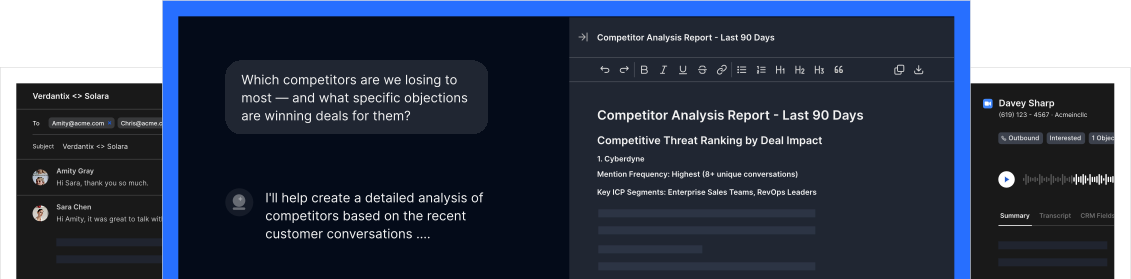
Pull deal context from your CRM and update your CRM automatically after every call.
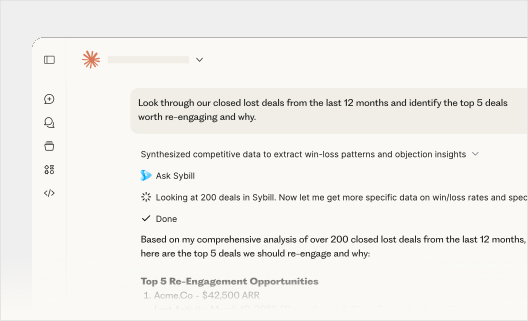
Connect Sybill to Claude, Chat, or your favorite tool to get Sybill’s deal data, context, and reasoning anywhere you need it.
.svg)
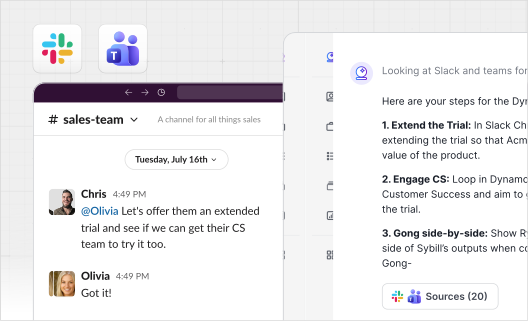
Pull in deal context from you Slack or Team channels, or push deal insights whenever your team works.

"Sybill is everything we hoped Gong would be"
RevOps at Activate the Magic
“Sybill’s AI is so much better than Gong’s”
Account Executive, WorkRamp
There’s no one-size-fits-all when it comes to AI usage, but here’s some example actions and how many credits they use.
You can read more about Sybill AI credits here.
If someone on your team runs out of credits, your Sybill admin can top-off your team’s credit balance by purchasing one-time 5000 credit bundles.
Running out of credits on the regular? Turn on Auto Top-off and Sybill will add more credits automatically when members of your team are running low.
Nope. You can choose between free, paid, or admin seats based on your teams needs.
Nope. Sybill workspaces allow users to work alongside their teams and share data, or do their own thing with a private account. The more users there are in a workspace, the more data Sybill has to learn from, but users can choose to keep separate workspaces from other users with the same web domain.
Free licenses allow a user to use Ask Sybill (500 credit limit), view meeting summaries, and watch recordings, but not record meetings.
Paid licenses give users more AI credits and let them record as many meetings as they’d like.
Administrator licenses are added on top of paid licenses at no extra cost. Admins can manage account permissions, add or remove users, and manage integrations.
For 14 days you’ll get free access to Sybill’s Business plan, no credit card information required. After 14 days, we’ll save your recordings, but your account will be moved to a collaborator license and you won’t be able to record new meetings in Sybill without purchasing a plan.
Your Sybill Admin can add or remove Sybill licenses directly from the Sybill app and your billing will be adjusted automatically.
Any plan upgrades will be pro-rated for the remainder of your billing cycle and billed immediately, and your new subscription total will be reflected in your next billing cycle.
Any plan downgrades will take effect at the next billing cycle. We do not offer credits or refunds for plan cancellations, changes, or unused licenses in the middle of your subscription.
Duh! Check out this interactive demo or book some time with our sales team to get a one-on-one demo.