
Find us at booth #83, join us for a harbor side happy hour, or catch Gorish’s talk.

Sept, 16-18 > Learn more

%20(1).avif)
Mamta Tainwala

February 23, 2026
Before you read anything else, here's the honest decision tree:
One thing most small business CRM guides won't tell you: the tool matters less than the data quality inside it. A CRM with incomplete, manually entered fields is a liability, not an asset. AI automation that keeps that data accurate is worth more than any feature set comparison.
The average small business owner evaluates three CRMs before picking one, spends two weeks onboarding it, and then discovers that the feature they actually needed is locked behind the next pricing tier. Sound familiar?
Choosing a CRM when you're a lean team is a genuinely difficult decision. The enterprise options are overwhelming. The cheap options miss critical features. And everyone on a product demo sounds like they built the software specifically for your company.
We cut through it. Seven CRM options, ranked by what they actually do well for small teams, with real trade-offs included. Whether you need a free starting point, a visual pipeline, or AI that handles your admin automatically, there's a clear answer here for your specific situation.
Before the rankings, a quick calibration. A great CRM for a 300-person revenue team is often a bad CRM for a small business. The criteria are different.
For small teams, the right CRM is one that:
With that framework in place, here are the seven best CRM options for small businesses in 2026.
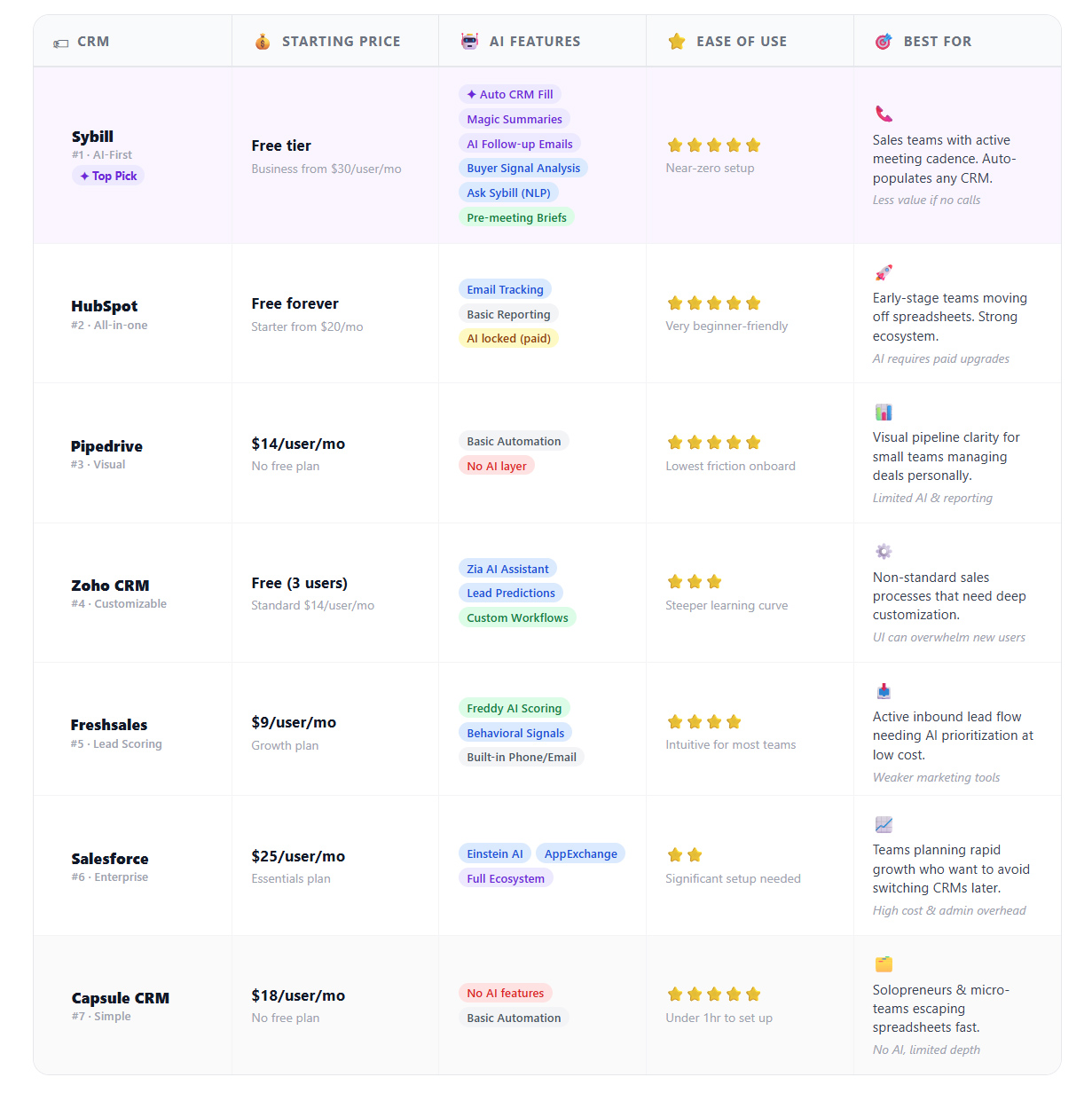
Best for: Sales-driven small businesses with an active meeting cadence Starting price: Free tier available; Business plan from $30/user/month
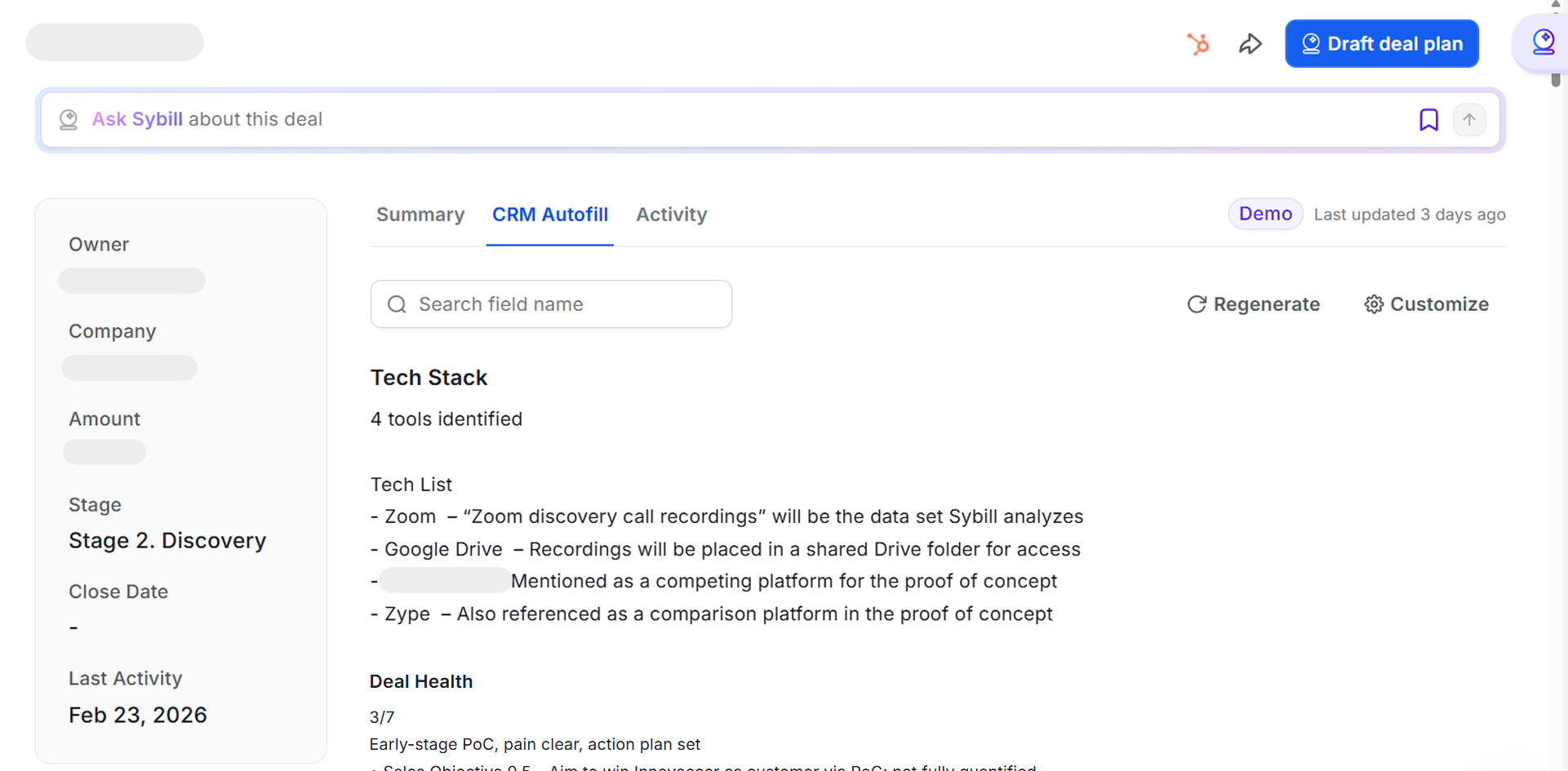
Sybill is not a traditional CRM, but it belongs at the top of this list because of what it does to the CRM experience for small sales teams. Where most CRMs ask reps to update records manually, Sybill does it automatically after every call, reading the conversation for deal-relevant signals and populating your existing CRM fields without any human in the loop.
For a small business rep juggling five to ten active deals and back-to-back calls, this is a genuine game-changer. The tool joins your calls, generates a structured Magic Summary covering pain points, objections, next steps, and buyer signals, drafts a follow-up email in your voice, and updates Salesforce, HubSpot, Zoho, or Dynamics 365 before you've had a chance to pour your post-call coffee.
The CRM automation is only part of the story. Sybill also gives small teams access to Ask Sybill, a plain-language query interface across all your deals, calls, emails, and CRM data. A founder can ask "which deals have stalled in the last 14 days?" and get a ranked list with context. No analyst required.
What it does best:
Honest trade-off: Sybill is built for teams with a meeting-heavy sales motion. If your entire sales process is cold email with no calls, you'll get less mileage from it. For call-driven teams, there is nothing else on this list that comes close at the intelligence and automation layer.
Get started for free with Sybill and see how much time comes back when the admin runs itself.
Best for: Early-stage teams that want a free CRM with room to grow Starting price: Free forever plan; Starter from $20/month
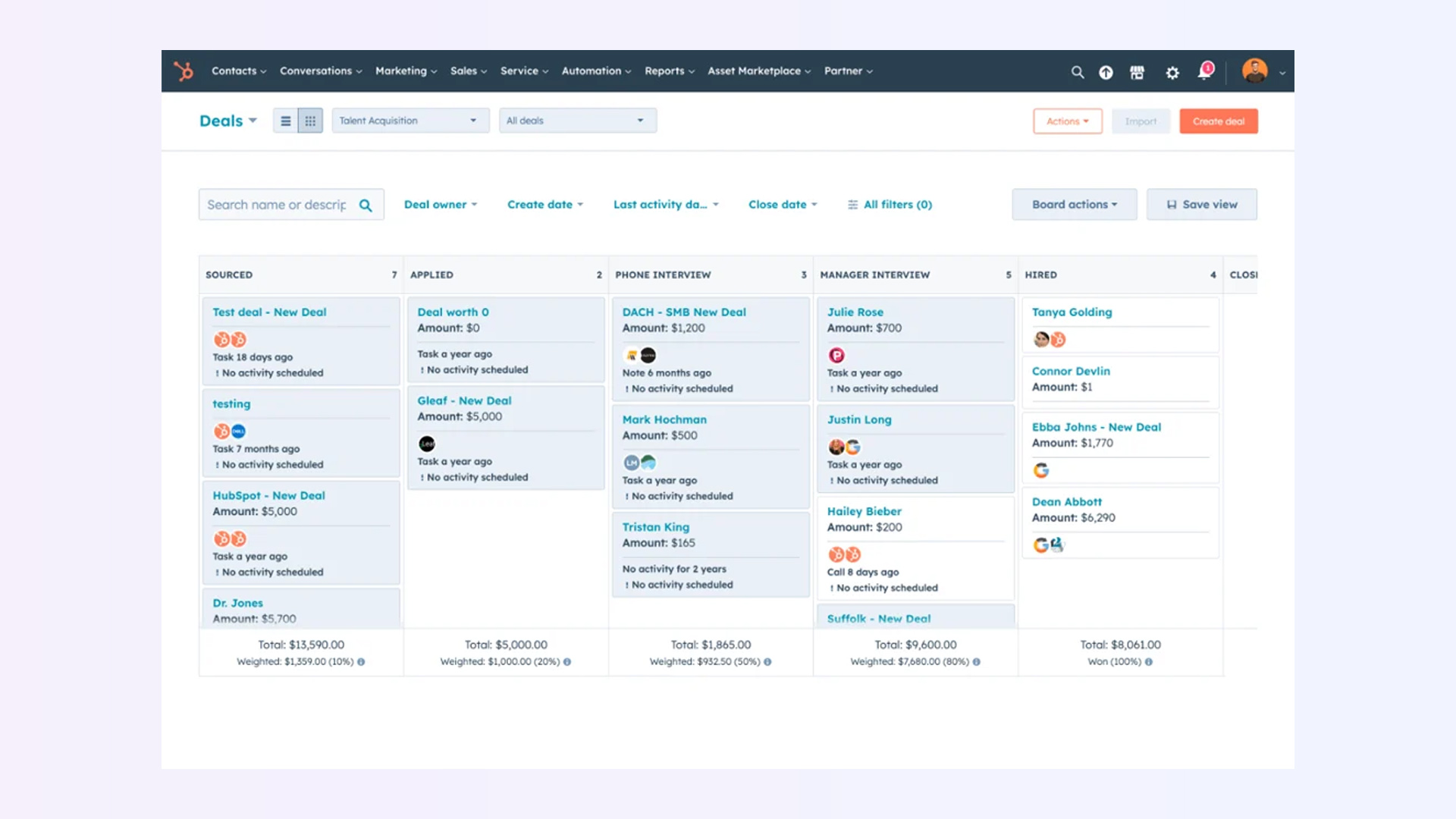
HubSpot's free CRM remains the most generous starting point in the market. You get unlimited users, deal pipelines, contact management, email tracking, a meeting scheduler, and basic reporting without spending a dollar. For a small business moving off spreadsheets, it's an excellent first step.
The honest reality is that HubSpot's free CRM is a foundation, not a destination. Automation, sequences, and deeper reporting are locked behind paid tiers that add up quickly. And the AI capabilities baked into the free plan are limited compared to tools built around intelligence from the ground up.
That said, HubSpot and Sybill make a strong combination that many revenue teams are running in 2026: HubSpot as the CRM record system, Sybill as the intelligence and automation layer on top of it. They integrate natively, and Sybill's CRM Autofill writes directly into HubSpot fields.
What it does best: Free CRM with solid contact and pipeline management, strong ecosystem for future scaling.
Honest trade-off: Advanced automation and AI features require paid upgrades that can get expensive quickly.
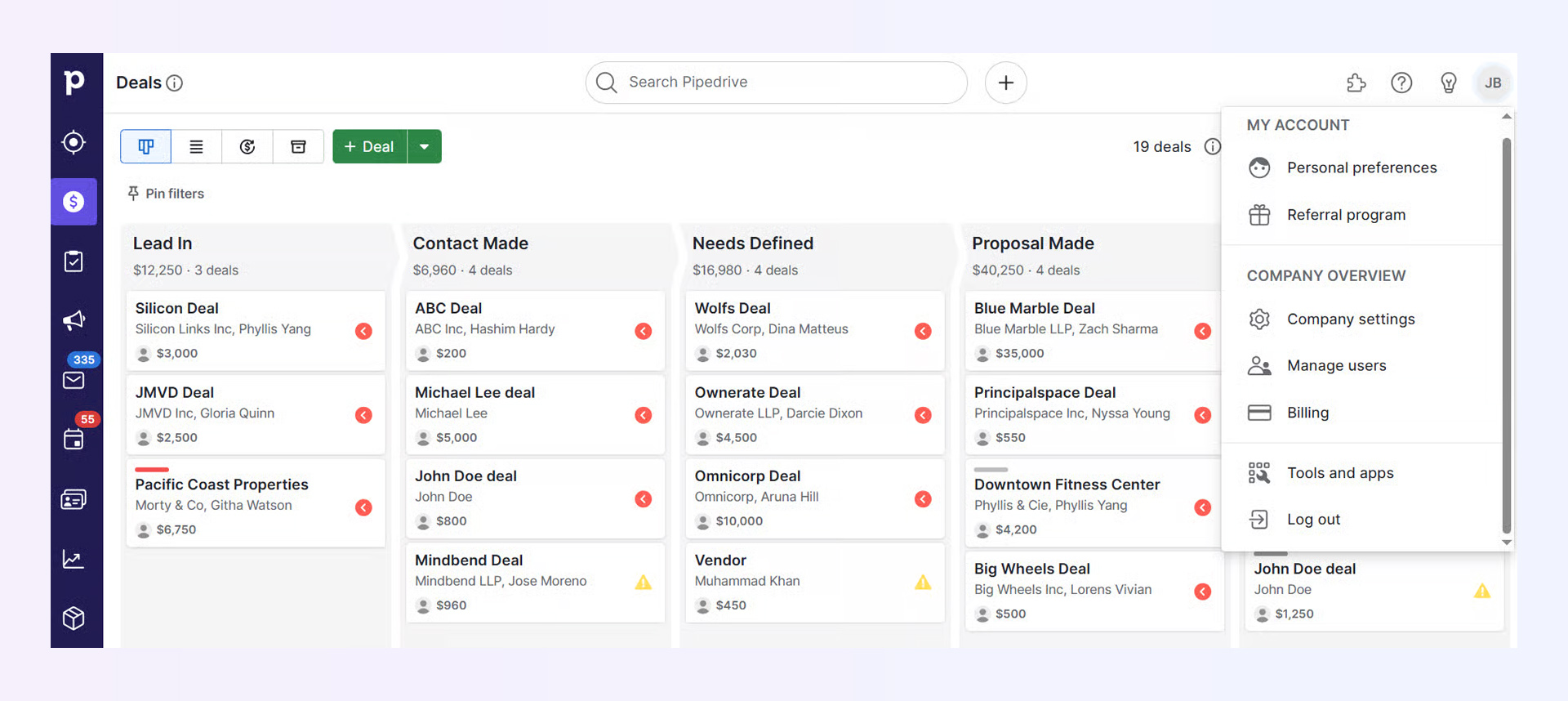
Best for: Small sales teams that need clarity on deal status at a glance Starting price: $14/user/month
Pipedrive is built around one core idea: your sales process should be visible. Every deal, contact, and activity is organized around a central pipeline view that tells you exactly what needs to happen next.
For small businesses where the founder or a tiny team is managing every deal personally, the visual simplicity of Pipedrive reduces friction. You see where everything is. You know what needs attention. You act.
It's not trying to be an AI platform. The automation features are basic, the reporting is lighter than larger platforms, and there's no meaningful intelligence layer baked in. But for a small team that just needs to stop dropping balls, Pipedrive earns its price.
What it does best: Clean, intuitive pipeline management with low onboarding friction.
Honest trade-off: Limited AI features and lighter reporting compared to more robust platforms.
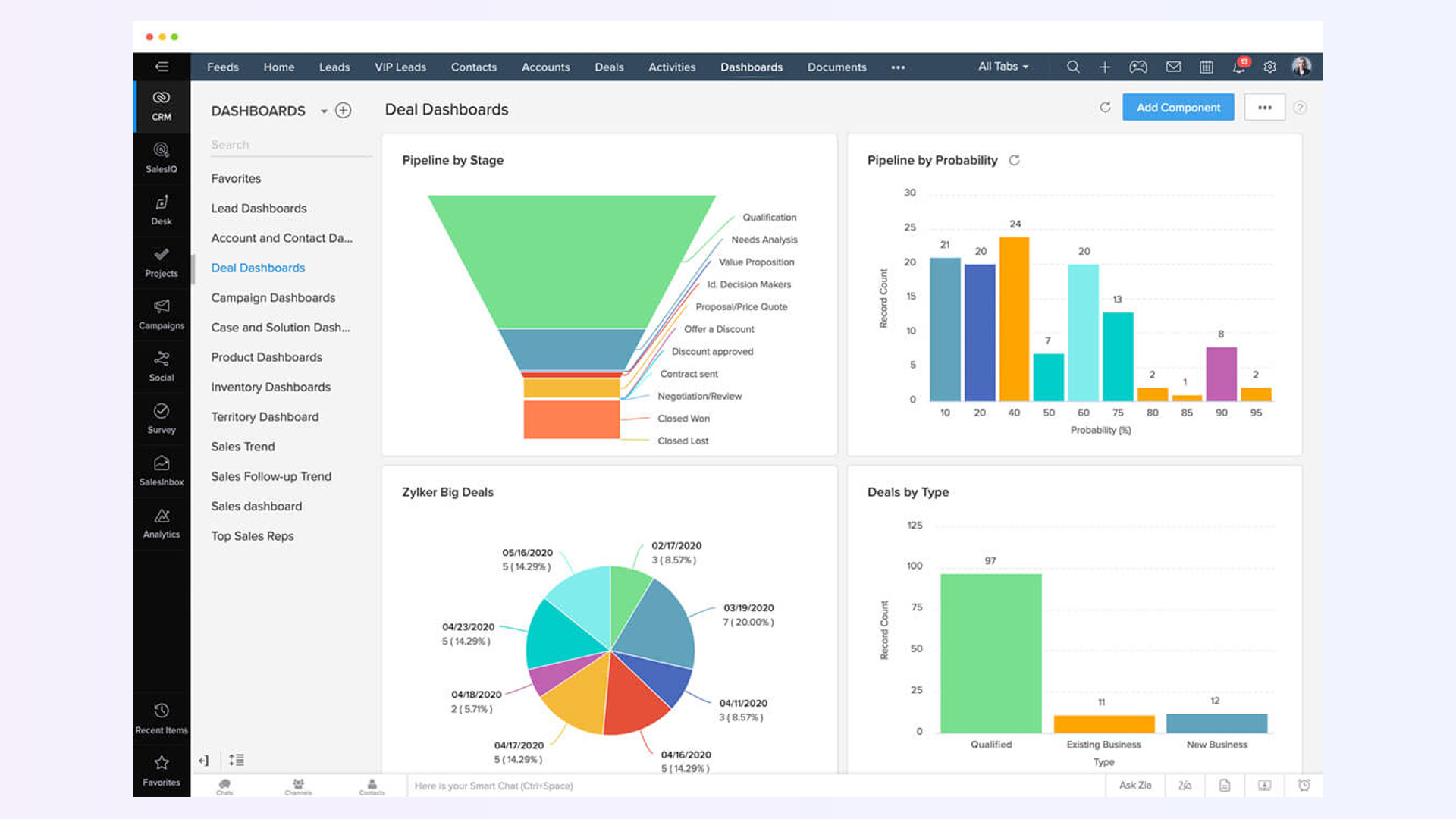
Best for: Small businesses with non-standard sales processes Starting price: Free for up to 3 users; $14/user/month (Standard)
Zoho gives small businesses a level of customization that most entry-level CRMs reserve for enterprise plans. Custom workflows, fields, multi-channel communication, and an AI assistant called Zia for lead predictions are all available at pricing that doesn't punish small teams.
The interface can feel overwhelming to new users, and the workflow builder has a steeper learning curve than more visual tools. But for a small business with a specific sales process that doesn't fit standard templates, Zoho bends where others won't.
What it does best: Deep customization and multi-channel communication tools at an accessible price point.
Honest trade-off: Higher learning curve; UI can overwhelm new users.
Best for: Small businesses with active inbound lead flow Starting price: $9/user/month (Growth)
Freshsales bakes AI lead scoring into its core product via an assistant called Freddy. Reps know which leads are most likely to convert based on engagement, profile fit, and behavioral signals. It's a genuine time-saver for small teams that don't have capacity to manually qualify every inquiry.
The built-in phone and email tools reduce the need for third-party integrations, which matters when you're running a lean stack. The trade-off is that Freddy's AI is narrower in scope than a full automation layer, and marketing tools are weaker compared to platforms like HubSpot.
What it does best: AI-powered lead scoring included in core plans, with built-in communication tools.
Honest trade-off: Marketing automation and advanced reporting are limited compared to larger platforms.
Best for: Small businesses that expect rapid growth and want enterprise CRM from day one Starting price: $25/user/month
Salesforce Essentials gives small teams access to the same underlying platform that powers enterprise sales organizations. The upside is that you'll never outgrow it. The downside is that the learning curve is real, setup takes time, and costs compound quickly as you scale users and features.
For a small business that's genuinely planning to become a mid-market company in the next 18 months and wants to avoid switching CRMs mid-growth, Essentials is worth the complexity tax. For most sub-ten-person teams, it's more CRM than they need right now.
What it does best: Powerful, scalable platform with access to the full Salesforce ecosystem and AppExchange.
Honest trade-off: Steeper learning curve, higher cost at scale, and more admin overhead than lean teams may want.
Best for: Solopreneurs and micro-teams that just need to stop losing track Starting price: $18/user/month
Capsule does the basics well and gets out of your way. Contact management, a visual pipeline, task tracking, and integrations with G Suite and Mailchimp are all present. Setup takes under an hour. The interface is clean. There's no AI to speak of, no advanced automation, and no reporting depth, but if your current system is a spreadsheet and a prayer, Capsule is a meaningful upgrade.
What it does best: Fast setup, clean interface, solid core CRM functionality for everyday use.
Honest trade-off: No AI features, limited automation, and email marketing tools are basic.
Every tool on this list earned its spot based on the same framework: real-world usability for small teams, not feature count on a marketing page.
Usability over features: Plenty of CRMs promise the world on the demo. We prioritized tools that small teams can actually use without a dedicated admin or a six-month onboarding timeline.
Automation and intelligence: Teams that automate CRM updates, follow-ups, and lead scoring close more without hiring more. Tools that support genuine automation, not just static rules, scored higher.
Honest pricing: We looked at what a five-to-ten-person team actually pays after accounting for seats, automation features, and integrations, not just the headline plan price.
Integration quality: A CRM that doesn't connect to your email, calendar, conferencing tool, and Slack won't get used. Integration quality was a hard requirement.
This question comes up more and more as small businesses realize that their CRM is only as good as the data inside it. And most CRM data is incomplete because filling it accurately requires time that reps don't have.
The answer for meeting-heavy sales teams is yes. An AI layer like Sybill doesn't replace your CRM. It makes your CRM's data accurate, complete, and up-to-date automatically. The CRM becomes the system of record it was always supposed to be, because the AI is handling the entry.
For a practical look at how this plays out across different CRM tools and use cases, the best AI sales tools guide is worth your time. And if you're specifically thinking about how AI handles post-call CRM automation, that's covered in depth as well.
What is the best free CRM for small business?
HubSpot CRM offers the most generous free plan on the market, with unlimited users, deal pipelines, email tracking, and a meeting scheduler at no cost. Zoho CRM also has a free tier for up to three users. Keep in mind that both gate their better automation and reporting features behind paid plans.
What CRM is easiest to use for a small team?
Capsule CRM and Pipedrive are consistently rated the easiest to set up and use. Both have clean interfaces, low learning curves, and fast onboarding. Capsule is the better pick if you just need to get organized; Pipedrive is the better pick if visual pipeline management is your priority.
Does a small business really need a CRM?
If you have more than five active relationships to manage at any given time and you're tracking them in a spreadsheet, a CRM will immediately pay for itself in time saved and follow-ups not dropped. The question isn't whether you need one. It's which one fits your actual workflow.
What's the difference between a CRM and an AI sales tool like Sybill?
A CRM stores and organizes customer data. An AI sales tool like Sybill feeds that CRM with accurate, real-time data from calls and emails automatically, then surfaces intelligence across that data for reps and managers. They work best together: CRM as the record system, Sybill as the intelligence and automation engine on top of it.
How do I know when I've outgrown my current CRM?
Clear signs include: data entry becoming a part-time job, follow-ups falling through the cracks, pipeline reviews requiring significant manual prep, and reps complaining that the CRM is slowing them down instead of helping them. At that point, adding an AI automation layer or moving to a more intelligent platform makes sense.
Can small businesses afford AI CRM tools?
Yes. Sybill's free tier is available for teams getting started, with paid plans beginning at $30/user/month for core features. The time saved on admin alone, often 90 minutes or more per rep per day, more than offsets the cost for any team with a meaningful call volume.
Which CRM integrates best with Salesforce and HubSpot?
Most tools on this list integrate with HubSpot and Salesforce to varying degrees. Sybill integrates natively with both and writes directly to CRM fields rather than just appending notes, which makes a meaningful difference for data quality and pipeline visibility.
Your CRM should make selling easier, not harder. If your team's biggest bottleneck is admin, try Sybill for free and see what changes when the CRM takes care of itself.
HubSpot CRM offers the most generous free plan on the market, with unlimited users, deal pipelines, email tracking, and a meeting scheduler at no cost. Zoho CRM also has a free tier for up to three users. Keep in mind that both gate their better automation and reporting features behind paid plans.
Capsule CRM and Pipedrive are consistently rated the easiest to set up and use. Both have clean interfaces, low learning curves, and fast onboarding. Capsule is the better pick if you just need to get organized; Pipedrive is the better pick if visual pipeline management is your priority.
If you have more than five active relationships to manage at any given time and you're tracking them in a spreadsheet, a CRM will immediately pay for itself in time saved and follow-ups not dropped. The question isn't whether you need one. It's which one fits your actual workflow.








