
Find us at booth #83, join us for a harbor side happy hour, or catch Gorish’s talk.

Sept, 16-18 > Learn more

%20(1).avif)
Mamta Tainwala

March 19, 2026
Your CRM should be the engine that keeps deals moving. In practice, for most sales teams, it is the thing they grudgingly update at the end of the week because their manager asked them to.
That gap between what CRMs promise and what sales reps actually experience is exactly what makes this comparison worth having. Salesforce, HubSpot, and Pipedrive are three of the most widely used CRM platforms in B2B sales, and they each represent a fundamentally different philosophy about what a CRM should do.
Salesforce says: give your organization total control over every process, every field, every workflow. HubSpot says: tie sales and marketing together in one clean platform and make onboarding fast. Pipedrive says: build the whole thing around the sales rep and get out of the way.
None of those philosophies is wrong. One of them is probably right for your team. This guide breaks down all three across the dimensions that actually matter: pricing, features, ease of use, AI, integrations, and the question that everyone skips in these comparisons, what happens to your data after the call ends.
Founded in 1999, Salesforce invented the cloud CRM category and still holds roughly 23.8% of the global CRM market. It has since grown well beyond CRM into a full enterprise operating system spanning sales, marketing, customer service, analytics, and commerce, all connected through a common data model and a custom-build-anything architecture.
Salesforce's core differentiator is configurability. You can model almost any business process inside the platform. The tradeoff is that doing so requires significant investment in people, time, and often outside consultants. One analysis of a 10-user Salesforce implementation found real-world year-one costs of $37,000 or more once implementation, training, and add-ons are factored in. For large enterprises that can capitalize on that investment, the payoff is genuine. For smaller teams without dedicated Salesforce admins, the gap between what the platform can do and what it actually does for their reps is often frustrating.
Best for: Enterprise and mid-market companies with complex, multi-department sales processes and dedicated technical resources.
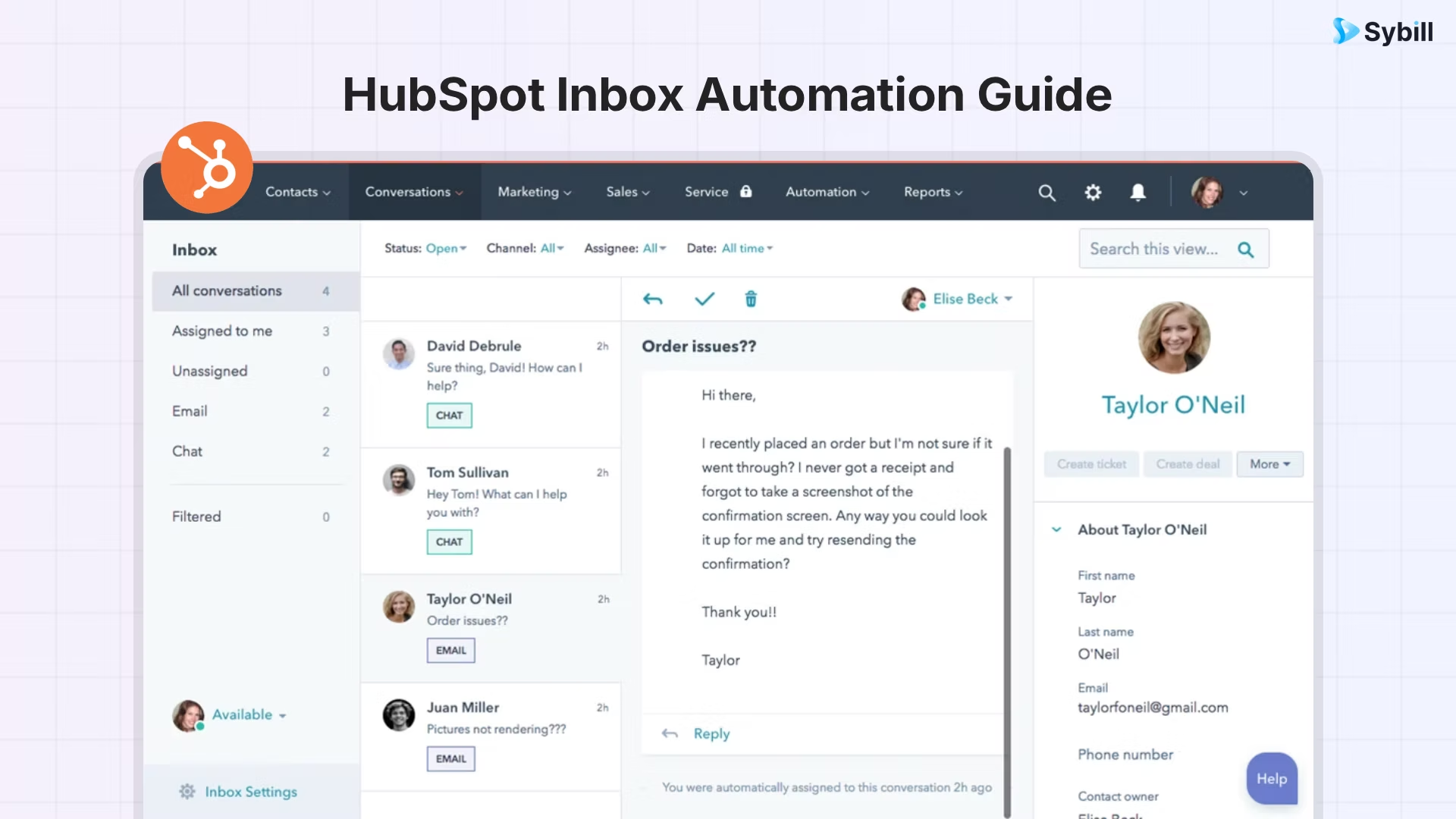
HubSpot started in 2006 as a marketing automation company and added its CRM in 2014. Today, it covers the full go-to-market stack through modular "Hubs" covering sales, marketing, customer service, content management, and operations. The platform is built around inbound methodology, meaning it is particularly strong for teams that generate leads through content, ads, and digital channels and need sales and marketing to operate off the same data.
HubSpot's free CRM is genuinely useful for early-stage teams. Contact management, deal pipelines, email tracking, meeting scheduling, and basic reporting are all available at no cost. The catch is that automation, sequences, and AI features unlock only at paid tiers that scale up quickly. At the Professional tier, HubSpot costs $100 per seat per month, which is comparable to Salesforce once both are properly set up for similar use cases.
Where HubSpot wins consistently is user experience. The interface is clean, guided onboarding reduces the learning curve significantly, and the platform is accessible enough that most reps can get productive in a day or two without dedicated training.
Best for: Small to mid-sized businesses that want marketing and sales in one platform with fast, intuitive setup.
Pipedrive was founded in 2010 by Timo Rein and Urmas Purde, two salespeople who were genuinely frustrated with CRMs built for managers and organizations rather than the reps who actually live in them. That origin story is still visible in the product today.
Pipedrive is organized around a visual Kanban pipeline. Every deal is a card. Every stage is a column. Drag the card to move the deal forward. It is about as close to "how salespeople actually think about their pipeline" as any CRM on the market. It does not try to be a marketing platform. It does not include a content management system or a customer service hub. It is a sales CRM, and it is very good at being exactly that.
This focused design comes with genuine tradeoffs. Marketing automation, advanced reporting, and AI capabilities are lighter than what you get from HubSpot or Salesforce. But for teams that want maximum sales-floor usability at a predictable, affordable price, Pipedrive regularly tops user satisfaction rankings. SoftwareReviews rated it the overall number-one CRM for ease of use and product features in its most recent data quadrant.
Best for: Sales-led SMBs and B2B teams that want a fast, visual, pipeline-first CRM without the complexity or cost of an enterprise platform.
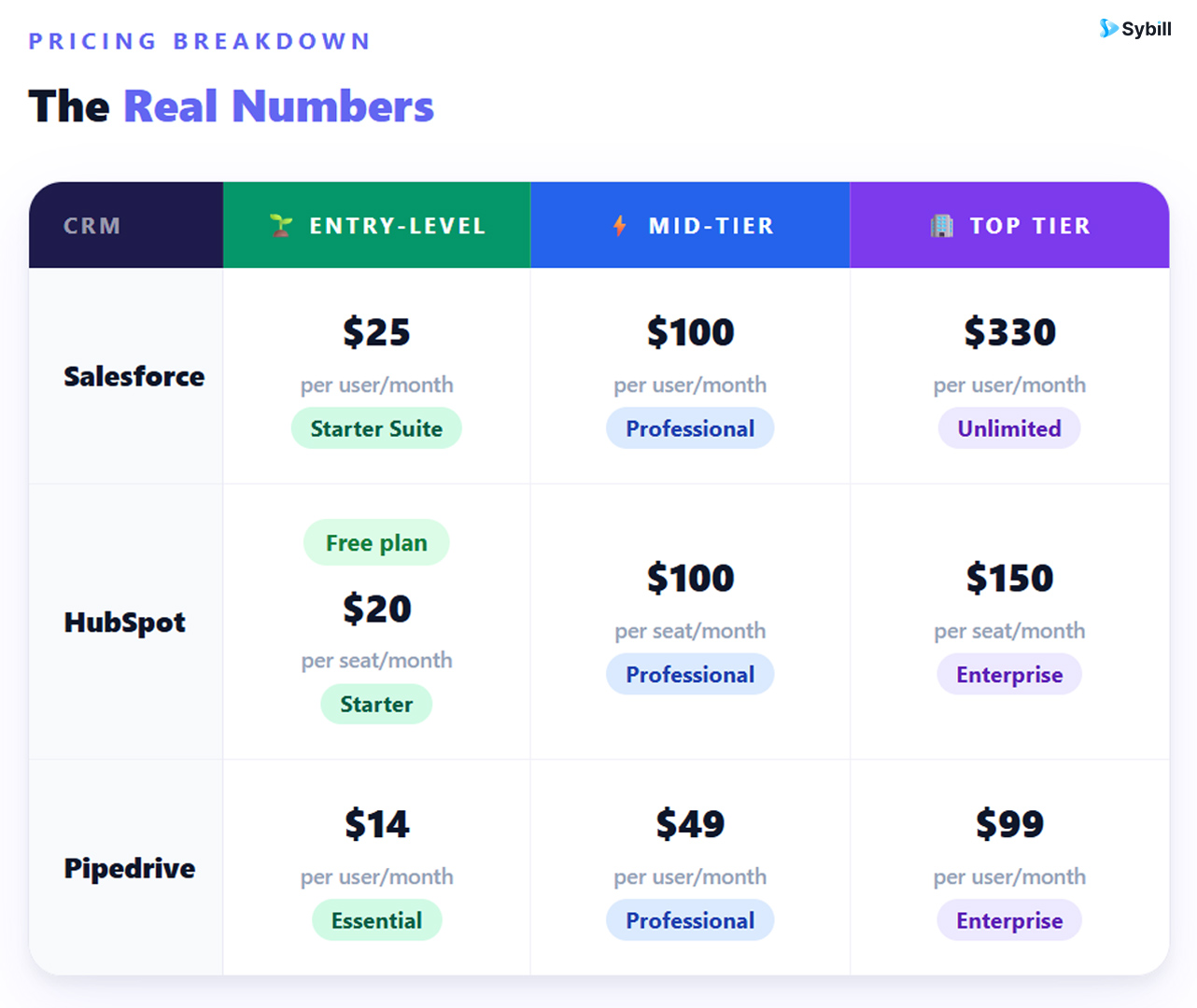
Pipedrive wins on price clarity. What you see is close to what you pay. Most capabilities are included in the base plans without surprise add-ons. A 10-person sales team on Pipedrive Professional pays roughly $490 per month. The same team on HubSpot Professional runs closer to $1,000 per month. The same team on Salesforce Professional, once implementation, training, and required add-ons are calculated in, can reach several times that figure in year one.
That said, price alone is not a decision. A CRM that costs $300 per month but drives 40% more closed deals pays for itself quickly. The right question is not which is cheapest. It is which delivers the best return for your specific team.
Pipedrive's pipeline view is its calling card. The drag-and-drop Kanban interface gives reps instant visibility into where every deal stands. Stages are fully customizable. Activity types, fields, and deal views all reflect how your specific sales process works, not a generic template. For reps who live in the pipeline every day, Pipedrive's interface reduces cognitive friction in a way that genuinely changes how often people update their data.
Salesforce's pipeline management is more powerful but considerably more complex. Opportunity stages, forecast categories, sales processes, and AI-powered pipeline inspection are all available. With a well-configured Salesforce instance, you get an incredibly detailed picture of every deal. Without one, you get a system that can technically do everything and practically does whatever the last admin left behind.
HubSpot sits between the two. The deal board is clean and visual, stages are customizable, and the interface is approachable for new users. HubSpot does not reach Pipedrive's sales-floor intuitiveness or Salesforce's analytical depth, but it is a solid, usable pipeline experience that works well for teams of most sizes.
If your primary concern is pipeline visibility without setup friction, Pipedrive is the winner. For data-driven pipeline inspection at scale, Salesforce's capabilities are unmatched once properly configured.
Salesforce's automation capabilities are the deepest of the three. Workflow rules, approval processes, sequence-based outreach with Salesforce Engage, and AI-driven next-best-action suggestions are all available across different tiers. The limitation is that activating most of these capabilities requires configuration work and often a consultant. Features like Pardot for marketing automation start at $1,250 per month as a separate add-on, so the true automation investment at Salesforce extends well beyond the base license.
HubSpot's automation is the most accessible of the three. Email sequences, task automation, lead scoring, and workflow builders are available through a visual interface that does not require developer support. The deeper automation features, including multi-step workflows and predictive lead scoring, are gated behind the Professional and Enterprise plans. For teams with a marketing function running alongside sales, HubSpot's automation is where it earns its price premium over Pipedrive.
Pipedrive's automation is intentionally lightweight. You can set reminders when a deal sits idle, trigger follow-up emails when a stage changes, and automate simple task creation. In 2024 and 2025, Pipedrive added an AI Sales Assistant that nudges reps about stalling deals and suggests next steps. It is helpful and unobtrusive. It is not, however, comparable to the workflow automation depth available in HubSpot's mid-tier plans.
For most CRM automation use cases that sales teams actually care about, including deal stage updates, follow-up task creation, and basic email sequences, all three platforms deliver. The gap shows up at the edges: complex multi-branch workflows, cross-tool data syncing, and AI-guided rep activity.
Salesforce's contact records are the most comprehensive available in a commercial CRM. Interaction history, social data, engagement scoring, custom fields, related records, and AI-generated next-step recommendations all live in one place. For enterprises managing thousands of accounts across multiple territories, this depth is what keeps deals from falling through the cracks.
HubSpot's contact management is built for speed and clarity. Records are easy to read, activities are logged automatically when email is connected, and the relationship between contacts, companies, and deals is intuitive. HubSpot can store up to one million contacts on the free plan, which removes a common scaling concern for growth-stage businesses.
Pipedrive keeps contact records focused on what is relevant to a deal. You get contact details, interaction history, linked deals, and notes in a clean view. It does not offer the social enrichment or AI-powered insights of the other two, but it surfaces what a rep needs before a call without requiring navigation through multiple screens. For relationship-driven B2B sales, this simplicity is often an advantage.
Regardless of which CRM you choose, the quality of your contact data is only as good as what gets entered into it. Reps filling in fields manually after every call introduce errors, omissions, and delay. The CRM data quality and hygiene problem is not a CRM design issue. It is a data collection issue, and it affects all three platforms equally.
Salesforce's reporting is the strongest of the three, and it is not close. Einstein Analytics, customizable dashboards, AI-powered forecasting, and granular reporting across every object in the system give leadership teams the most complete picture of revenue performance available. For enterprises where forecast accuracy is a board-level concern, Salesforce's analytics depth justifies part of its premium.
HubSpot's reporting is modern, clean, and accessible. Custom report creation is intuitive. Revenue attribution reporting is available at higher tiers. For teams that want data-informed decisions without a business intelligence background, HubSpot's reports are easier to build and read than Salesforce's. The advanced forecasting features require the Professional plan and above.
Pipedrive's reporting is lighter and more focused on sales activity metrics. Pipeline conversion rates, deal velocity, individual rep performance, and activity completion rates are all trackable. It is not designed for enterprise-grade revenue analytics or multi-channel attribution, but for a sales team trying to answer "which deals are moving and which are stuck," it works well without requiring a RevOps analyst to configure it.
It is worth noting that the reliability of any CRM's reporting depends entirely on what data is in it. AI-driven sales forecasting methods that incorporate actual conversation signals, buyer intent, and engagement data are increasingly more accurate than forecast models built solely on rep-entered pipeline stages.
Salesforce's Einstein AI remains the most powerful CRM-native AI engine. Lead scoring, opportunity scoring, next-best-action recommendations, generative content tools, and Agentforce for building custom AI agents across sales, service, and marketing are available primarily at Enterprise and Unlimited tiers. The AI is genuinely capable. Getting it to work well requires proper data history, configuration, and often specialized expertise.
HubSpot's Breeze AI suite includes Breeze Copilot for in-context AI assistance across the platform, Breeze Agents for automating prospecting, content creation, and social media management, and Breeze Intelligence for buyer intent and data enrichment. The AI is more accessible across tiers than Salesforce's and easier to activate without technical help. It does not reach Einstein's depth in predictive analytics, but for most mid-market sales teams, Breeze covers the most useful 80%.
Pipedrive's AI Sales Assistant is the most straightforward of the three. It monitors rep activity, flags stalling deals, and suggests next steps based on deal history. It is useful and unobtrusive. Pipedrive added AI-written email suggestions and lead scoring in recent updates, which fills some of the gap with HubSpot's automation capabilities. However, Pipedrive's AI is categorically lighter than what Salesforce or HubSpot offer at comparable price points.
None of these CRM-native AI features, however, capture the intelligence that lives inside the sales conversation itself. What happens on the call, how the prospect responded, what objections came up, who was in the room and who was checked out, none of that makes it into your CRM through any of these three platforms automatically. That gap is where AI sales assistants operating at the conversation layer are increasingly where the real advantage sits.
This is Pipedrive's strongest category. The interface is clean, the visual pipeline is immediately intuitive, and setup typically takes two to three days versus the one to two weeks HubSpot requires and the weeks to months Salesforce implementations demand. Reps can get value from Pipedrive without reading a manual or sitting through onboarding webinars. For sales leaders who have experienced the frustration of buying a CRM that no one uses, Pipedrive's adoption rate is a compelling differentiator.
HubSpot is the second-best on ease of use. Guided onboarding helps new users navigate the platform quickly. The interface is clean and well-organized. Features are separated by function, and locked features are clearly marked with upgrade prompts rather than hidden. Most reps can get operational within a day or two.
Salesforce is the hardest to use of the three, by design. The platform is configurable enough to mirror almost any business process, which means there is no single "default" experience. The interface you see depends entirely on how it was set up, which fields were added, which layouts were customized, and which training was provided. Salesforce done well is excellent. Salesforce done halfway is a navigation maze that drives reps back to spreadsheets.
Salesforce's AppExchange has over 7,000 applications. If it exists in the sales technology ecosystem, Salesforce almost certainly connects to it. This breadth is unmatched, but a meaningful percentage of AppExchange integrations are paid, and complex integrations often require developer time to maintain.
HubSpot's App Marketplace has over 1,500 integrations, curated for quality and ease of installation. Most integrations are natively built, connect out of the box without configuration overhead, and are free. For teams using common tools like Gmail, Google Ads, Slack, Zoom, or Mailchimp, HubSpot's integrations are faster to activate than Salesforce's.
Pipedrive offers 500-plus integrations, with a strong marketplace and prebuilt Zapier templates that cover the majority of common tool connections. For marketing automation, which Pipedrive does not include natively, teams typically pair it with dedicated tools like Outfunnel, Mailchimp, or ActiveCampaign via connector. It requires more stitching than HubSpot's all-in-one approach, but the resulting stack is often cheaper and more tailored to actual needs.
Salesforce's support quality scales directly with your plan tier. 24/7 support is only available at the Unlimited plan ($330/user/month). Standard plans have a two-day response time for support tickets. For a platform as complex as Salesforce, a two-day response window when something breaks is a genuine operational risk.
HubSpot provides 24/7 email and chat support on paid plans, with phone support for Professional and Enterprise customers. Its knowledge base is extensive, and the community forums are active and well-maintained. For most teams, HubSpot's support is fast and sufficient.
Pipedrive offers 24/7 support via chat and email across all plans. Phone support is available on the Enterprise plan. The support quality is generally regarded as responsive and helpful for standard issues. Given Pipedrive's simpler architecture, most support questions are also resolved faster because the platform has fewer moving parts to troubleshoot.
Most CRM comparisons stop at the license fee. The real decision requires looking at the full cost over a 12-month period.
For a 10-person sales team, one independent analysis found that year-one total costs (including implementation, training, and required add-ons) ran approximately $4,000 for Pipedrive, $16,000 for HubSpot, and $37,000 or more for Salesforce. These numbers vary by setup complexity and team needs, but the directional truth holds: the advertised license fee is not the whole number, and Pipedrive's pricing transparency is a meaningful advantage for teams where budget predictability matters.
Choose Salesforce if:
Choose HubSpot if:
Choose Pipedrive if:
Here is what Salesforce, HubSpot, and Pipedrive share: they are all recording systems. They store what your reps choose to enter. That assumption quietly undermines everything else those platforms promise.
The average sales rep spends 15 to 30 minutes after every call logging notes, updating opportunity fields, and recording next steps. Multiplied across a team and a full quarter, that is five-plus hours of weekly admin that does not move any deal forward. And because the data comes from memory, it is incomplete. The prospect's hesitation about budget, the fact that legal was mentioned offhand, the competitor name that came up twice: none of that makes it into the CRM reliably.
This is the problem that all three CRMs leave for reps to solve manually. And it is the problem that sits at the root of inaccurate forecasts, missed follow-ups, and stalled deals that should have closed.
Get started for free with Sybill and see what happens when your CRM fills itself automatically after every call.
Sybill is not a CRM replacement. It is the conversation intelligence and automation layer that runs on top of whichever platform you choose and closes the data gap that all three leave open.
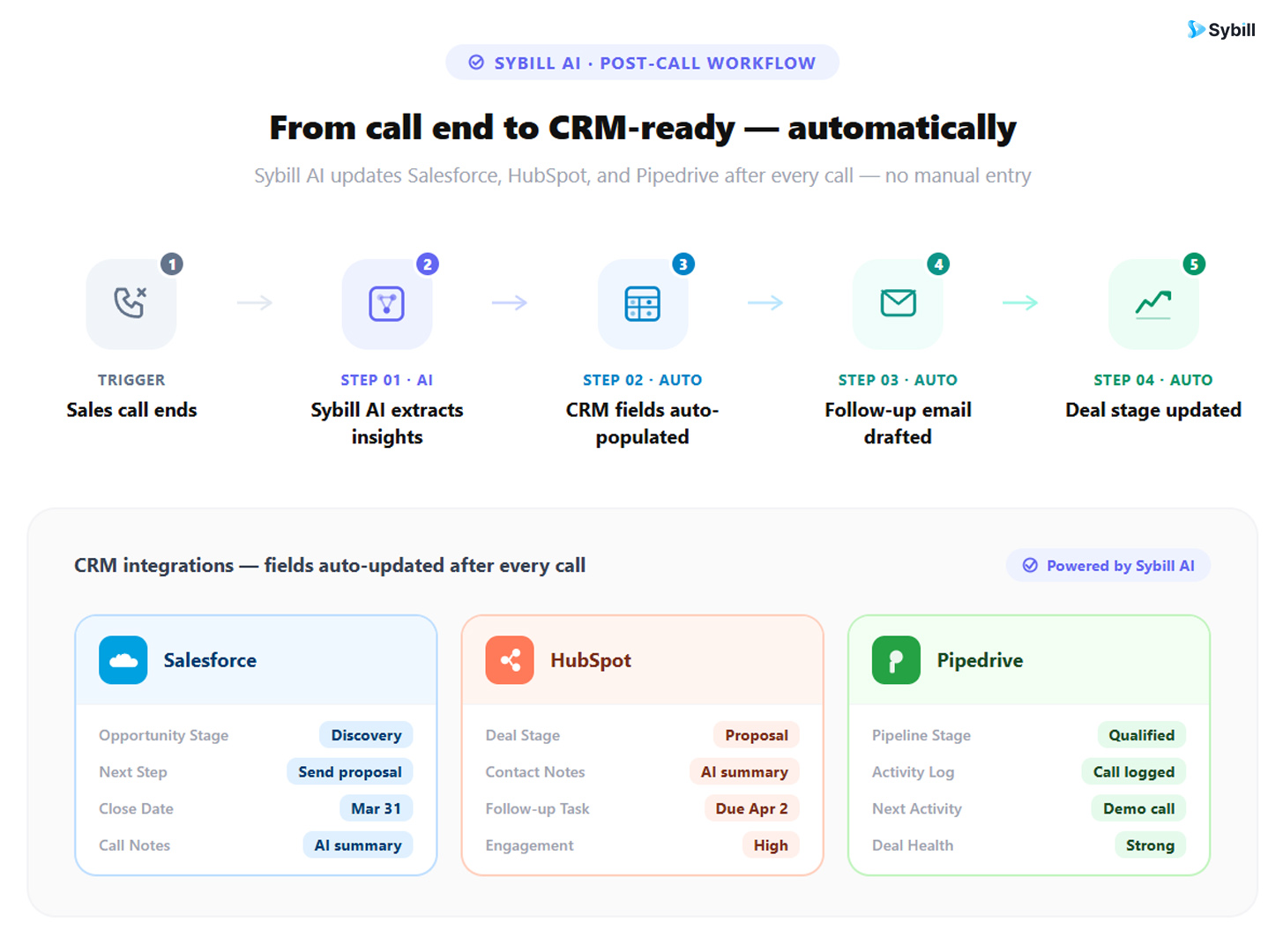
Sybill integrates natively with Salesforce and HubSpot, and connects to Pipedrive via Zapier, which means it works alongside whichever CRM you choose from this comparison. Here is what it does after every call:
CRM Autofill: Sybill reads the call transcript and email thread, extracts deal-relevant information, and writes it directly into your CRM fields. Budget signals, decision-maker identification, objections raised, agreed next steps, MEDDPICC and BANT criteria, competitor mentions: all of it goes in automatically with entries that read like a well-trained AE wrote them, not a bot. AEs on Sybill report saving four to six hours per week on CRM updates alone. That time goes back to selling.
Magic Summary: Within minutes of a call ending, reps receive a structured summary covering the call outcome, prospect pain points, next steps, key takeaways, and buyer engagement signals. Sales call transcripts become action plans rather than forgotten archives.
Ask Sybill: A natural-language querying interface that lets reps and managers ask questions across all deals, calls, emails, and CRM data in plain English. Which accounts raised pricing objections in the last 30 days? Which deals have gone quiet since the demo? Which reps are consistently skipping discovery questions? Ask Sybill returns answers in seconds. This is conversation intelligence software doing the analytical work that used to require a BI analyst and a half-day of spreadsheet work.
Non-Verbal AI Analysis: For video calls, Sybill analyzes body language and engagement signals. It identifies which stakeholders in a multi-person call are actively engaged and which are distracted, surfacing who your real champion is and who might be a silent detractor. For complex B2B deals with multiple decision-makers, this behavioral intelligence is the difference between sending the right follow-up and the wrong one.
Pre-Meeting Briefs: Auto-generated call prep notes pulling from the full deal history, previous call summaries, open next steps, and relevant CRM data. Reps walk into calls prepared without spending 20 minutes reviewing records across four tabs.
AI Follow-Up Emails: One-click follow-up drafts written in the rep's own voice, referencing what was specifically discussed on the call. Not a generic template. An email that sounds like the rep wrote it at their best, finished in seconds rather than 10 minutes.
For sales managers, Sybill generates coaching briefs per rep, deal health snapshots, and automated pipeline reviews. The AI agents for sales managers capability is especially valuable for teams using MEDDPICC or BANT, where field completeness directly affects forecast confidence. Sybill enforces completeness at the source rather than requiring managers to chase reps for updates at the end of each week.
This directly addresses the most consistent complaint from RevOps teams using all three CRMs in this comparison: CRM data is incomplete, forecasts are unreliable, and reps are spending too much time on admin. Sybill fixes all three at the same time by automating the data layer that CRMs depend on.
For teams evaluating the best AI sales tools for their stack, Sybill works as a standalone product or alongside existing call recorders, providing the post-call execution layer that most tools still leave manual.
And for organizations trying to move sales forecasting from gut feeling to data-backed precision, Sybill's deal summaries capture buyer sentiment, conversation engagement levels, and real-time signals that give leadership a genuinely honest view of pipeline health.
Get started for free with Sybill and connect it to whichever CRM you pick today.
What is the main difference between Salesforce, HubSpot, and Pipedrive?
Salesforce is the most powerful and customizable CRM, designed for enterprise teams with complex processes and dedicated technical resources. HubSpot is the strongest option for teams that want marketing and sales in a single platform with fast, accessible onboarding. Pipedrive is the most sales-focused of the three, built around visual pipeline management and high rep adoption, at the most predictable price point.
Is Pipedrive good for B2B sales teams?
Yes. Pipedrive is particularly well-suited for B2B sales teams with high-touch, relationship-driven sales processes. Its visual pipeline, activity-based selling model, and intuitive interface make it one of the most rep-friendly CRMs available. It is especially effective for SMBs and growing sales teams that do not need a full marketing hub built into their CRM. Explore the best CRM software for small businesses to see how Pipedrive stacks up against other options.
Does HubSpot replace Pipedrive or Salesforce?
Not entirely. HubSpot covers more of the go-to-market stack than Pipedrive, particularly on the marketing side, but it does not offer Salesforce's depth of customization or enterprise-scale analytics. For teams choosing between HubSpot and Pipedrive, the primary question is whether you need marketing automation built into the same platform. If yes, HubSpot. If you prefer to pair a best-in-class sales CRM with separate marketing tools, Pipedrive is typically cheaper and faster to set up.
What are the hidden costs of Salesforce, HubSpot, and Pipedrive?
Salesforce's hidden costs include implementation consulting, add-on products like Pardot for marketing automation (starting at $1,250 per month), and ongoing admin support. HubSpot's hidden costs come from plan upgrades required to unlock automation, advanced reporting, and AI features, plus per-contact pricing that increases as your database grows. Pipedrive's hidden costs are minimal by comparison. Most features are included in base plans, though add-ons like LeadBooster for lead generation and Campaigns for email marketing are priced separately.
What is the easiest CRM to set up and use?
Pipedrive is the fastest to set up, typically operational for a sales team in two to three days without dedicated IT support. HubSpot's guided onboarding makes it accessible within one to two weeks. Salesforce typically requires weeks to months for a proper implementation, and most organizations bring in certified consultants to handle configuration. Check out how AI tools reduce CRM adoption friction for teams at any platform.
How does Sybill work with Salesforce, HubSpot, and Pipedrive?
Sybill integrates natively with Salesforce and HubSpot, and connects to Pipedrive via Zapier. After every sales call and email, Sybill's AI extracts deal-relevant information and populates your CRM fields automatically, including pipeline stage, next steps, qualification criteria, stakeholder identification, and more. It also generates call summaries, drafts follow-up emails, and enables natural-language querying across all your deal data. Reps save four to six hours per week on admin. Read more about AI CRM use cases that are already running in modern sales teams.
Which CRM gives the most accurate sales forecasts?
Salesforce's Einstein AI delivers the most analytically robust forecasting when the platform is properly configured and CRM data is complete. HubSpot's forecasting tools are strong at mid-tier plans. Pipedrive's forecasting is lighter and more activity-based. However, forecast accuracy across all three platforms depends entirely on the quality of data in the system. Improving CRM data hygiene through automated data capture is often a more impactful investment than switching CRM platforms.
Salesforce is the most powerful and customizable CRM, designed for enterprise teams with complex processes and dedicated technical resources. HubSpot is the strongest option for teams that want marketing and sales in a single platform with fast, accessible onboarding. Pipedrive is the most sales-focused of the three, built around visual pipeline management and high rep adoption, at the most predictable price point.
Yes. Pipedrive is particularly well-suited for B2B sales teams with high-touch, relationship-driven sales processes. Its visual pipeline, activity-based selling model, and intuitive interface make it one of the most rep-friendly CRMs available. It is especially effective for SMBs and growing sales teams that do not need a full marketing hub built into their CRM. Explore the best CRM software for small businesses to see how Pipedrive stacks up against other options.
Not entirely. HubSpot covers more of the go-to-market stack than Pipedrive, particularly on the marketing side, but it does not offer Salesforce's depth of customization or enterprise-scale analytics. For teams choosing between HubSpot and Pipedrive, the primary question is whether you need marketing automation built into the same platform. If yes, HubSpot. If you prefer to pair a best-in-class sales CRM with separate marketing tools, Pipedrive is typically cheaper and faster to set up.





.avif)
